
Similar Tools
About YouTube transcript tool
What It Does
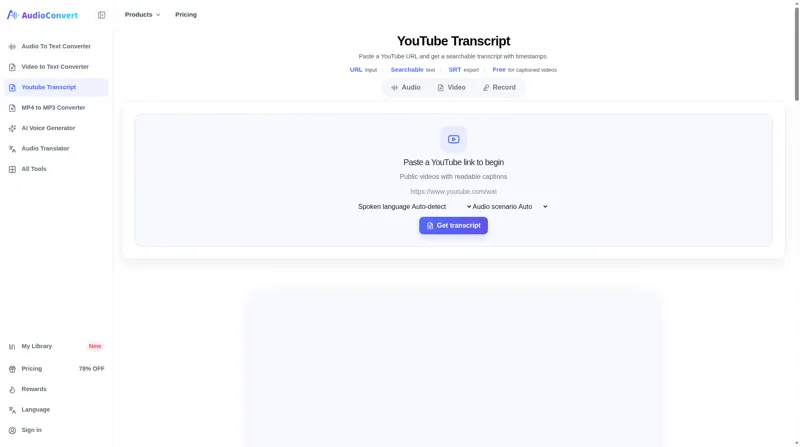
YouTube Transcript Generator retrieves existing caption tracks from public YouTube videos and presents them as searchable, timestamped text. Unlike speech-to-text engines, this tool extracts captions that are already embedded in the video—whether auto-generated by YouTube or manually uploaded by creators—and makes them easy to search, copy, and export.
Who It's For
This tool is ideal for researchers skimming long videos for key moments, content creators repurposing video material into blog posts or social media snippets, students and educators reviewing lecture content in a readable format, and anyone who needs exact quotes or timestamps before citing or clipping a video.
Key Features
• URL-only workflow – Paste any public YouTube watch, youtu.be, or Shorts link to retrieve captions instantly
• Timestamped segments – Jump to exact moments with preserved source caption timing
• Searchable text – Find keywords and phrases across the entire transcript
• TXT and SRT exports – Copy plain text or download subtitle-ready files
• Free caption retrieval – Videos with readable captions cost zero credits; only non-captioned videos sent to audio-to-text incur charges
• Multi-language support – Auto-detect or choose from supported languages when caption tracks are available
How It Works
- Paste a public YouTube URL (watch, youtu.be, or Shorts)
- The tool retrieves the available caption track from YouTube
- Review timestamped segments, search for keywords, and export TXT or SRT files
Videos without readable captions are not charged but require the separate Audio to Text workflow.
Use Cases
• Research and quote discovery – Locate exact timestamps before citing or clipping
• Accessibility – Review spoken content in a readable, searchable format
• Content repurposing – Turn videos into notes, posts, summaries, and subtitles
• Academic and professional note-taking – Skim lectures, webinars, and presentations efficiently
What Sets It Apart
YouTube Transcript Generator does not perform speech recognition. Instead, it extracts captions that YouTube already provides, ensuring you get the real caption track—no invented words, no audio processing delays. This makes it fast, free for captioned videos, and perfectly suited for workflows that depend on accurate, verifiable source text.
AI Tool
Analytics
AI Tool Categories
AI agents designed to enhance personal and professional productivity by automating tasks, managing schedules, prioritizing work, and providing insights to improve efficiency.
AI Tool Use Cases
Research and Analysis
Assist with research and data analysis
Transcription
AI transcription converts audio or video content into written text using artificial intelligence. This use case streamlines the process of creating accurate, time-stamped transcriptions for interviews, meetings, podcasts, lectures, and more, enabling efficient content management and accessibility.
Reviews
Need help implementing YouTube transcript tool?
Connect with certified implementation partners who can help transform your business with YouTube transcript tool. Our vetted experts specialize in AI integration and deployment.
Find Implementation PartnersVetted Experts
Pre-screened partners with proven expertise in AI implementation
Fast Deployment
Accelerate your AI integration with experienced professionals
Guaranteed Results
Work with partners who understand your business needs
AI Tool
Analytics
AI Tool Pricing
Free Tier AvailableFreemium Model
Free basic features with premium features available for paid users. Start for free and upgrade as needed.
Prices may vary based on usage volume and selected features. Contact sales for custom enterprise pricing.
Integration Methods
Need help implementing YouTube transcript tool?
Connect with certified implementation partners who can help transform your business with YouTube transcript tool. Our vetted experts specialize in AI integration and deployment.
Find Implementation PartnersVetted Experts
Pre-screened partners with proven expertise in AI implementation
Fast Deployment
Accelerate your AI integration with experienced professionals
Guaranteed Results
Work with partners who understand your business needs
Similar Tools

Avidnote
AI research assistant for writing papers, reading documents, analyzing data, and transcribing interviews.

ThetaWave
AI note-taking tool for college students that transforms lectures and documents into study materials.

LinkToText
Turn Instagram Reels and videos into searchable transcripts for captions, subtitles, and content repurposing.
TubeTranscript
TubeTranscript converts YouTube videos into clean, timestamped transcripts.
Featured Agents
Discover our hand-picked selection of exceptional AI agents

Unbounce
Unbounce Inc.
AI-powered landing page builder with no-code A/B testing and conversion optimization for marketers.
(0.0)

Wispr Flow
Wispr
AI-powered voice dictation that turns natural speech into polished writing 4x faster than typing.
(0.0)
Palabra.ai
Palabra AI
Real-time AI speech translation for live calls, events, and streams in 60+ languages.
(0.0)

Replit
Replit, Inc.
AI-powered platform for building full-stack apps with parallel agents, no coding required.
(4.0)
KnockoutStocks
KnockoutStocks
Smart stock analysis platform with AI-powered factor scoring for investment decision-making.
(5.0)