
Similar Tools
About Slesh.ai
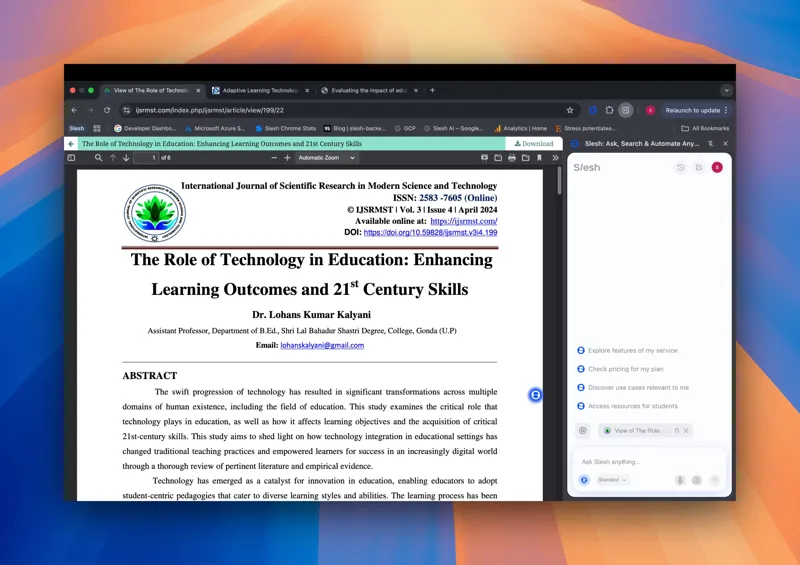
⚡ What You Can Do with Slesh ❓ Ask any page anything—Slesh reads the page, understands visuals, searches the internet for more sources, and answers in real time. ✍️ Get writing help, feedback, or problem-solving on Docs, Sheets, Slides, Canva, and more 📄 Summarize PDFs directly in your browser, no downloads needed 🎬 Get instant TL;DRs of YouTube videos, Shorts, and Reels ⚙️ Do anything on any site — just tell Slesh what you need, and it searches, takes you to the right page, clicks the right button, and gets it done across Gmail, GitHub, LinkedIn, or any website. Skip the guesswork of finding where to go. 🔁 Automate workflows like: “Find all product managers on linkedin and send the connect invites" 🧠 Compare tabs and recall content — ask Slesh to remember and compare what you were reading
💬 Why It’s Different Slesh isn’t just a sidebar chatbot or a summarizer. It’s a real AI copilot that understands what’s on your screen — and acts on it. Whether you’re working, researching, shopping, or learning, Slesh turns every site into something you can talk to and control.
✨ Why You’ll Love Slesh - 💬 Sidebar Chat Interface – Ask questions, summarize, help , or interact with any page - ⚙️ End-to-End Automation –Effortlessly execute multi-step tasks with simple commands like "Email every person on this google sheet" - 🧠 Tab Memory & Smart Switching – Slesh remembers what’s in each tab and lets you compare, summarize, or act across them. Get instant TL;DRs of articles, videos, and complex documents - 🔍 Smart Site Navigation – Use natural language to explore Gmail, Twitter, GitHub, Amazon, and everywhere on the internet. Skip the guesswork of finding where to go. - 📎 Always-On Assistant – The sidebar stays with you as you browse, with no need to copy-paste or switch tabs
🧪 Sample Prompts - “Summarize this article” - “Unread emails from this week” - “What’s the main point of this video?” - "Email every person on this google sheet" - "What do you think of this draft? Does this match the other page I saw?" - “Click the Apply button” - “List open PRs” - “Translate this to French” - “Add this to cart and go to checkout” - "Buy me all the recipes on this page with instacart"
AI Tool
Analytics
AI Tool Categories
Large language models and foundation models for various applications
AI agents that automate various workflows and processes
AI agents specialized in managing, automating, and optimizing email tasks. These agents can handle email writing, sorting, scheduling, personalization, and outreach, saving time and boosting productivity.
AI Tool Use Cases
Document Analysis
AI-powered extraction and understanding of information from various document formats including PDFs, images, and text files
Sales and Marketing
AI-powered solutions for enhancing sales strategies and marketing campaigns.
Content Generation
AI-powered tools that generate content for blogs, social media, and other platforms based on given prompts and topics.
Reviews
Need help implementing Slesh.ai?
Connect with certified implementation partners who can help transform your business with Slesh.ai. Our vetted experts specialize in AI integration and deployment.
Find Implementation PartnersVetted Experts
Pre-screened partners with proven expertise in AI implementation
Fast Deployment
Accelerate your AI integration with experienced professionals
Guaranteed Results
Work with partners who understand your business needs
AI Tool
Analytics
AI Tool Pricing
Free Tier AvailableFree Model
Completely free to use with no hidden costs. Access all features without any payment required.
Paid plans starting from
Free tier includes basic features to get started
Prices may vary based on usage volume and selected features. Contact sales for custom enterprise pricing.
Integration Methods
Google Chrome browser extension
Software as a Service integration
Direct website or browser integration
AI agents to interact seamlessly with LinkedIn, enabling automated professional networking, job application assistance, content sharing, lead generation, and profile management. This integration streamlines tasks such as connection requests, personalized messaging, and post scheduling, enhancing efficiency for professionals and businesses.
AI agents on Instagram assist with scheduling posts, automating DMs, and analyzing content engagement to optimize strategies.
Leverage AI agents to automate data entry, create real-time insights, and manage complex datasets directly within Google Sheets for enhanced productivity.
Enable AI agents to draft, summarize, and edit documents collaboratively in Google Docs, streamlining content creation processes.
AI agents can integrate with Google Calendar to schedule meetings, optimize event timing, and provide intelligent reminders based on user preferences.
Need help implementing Slesh.ai?
Connect with certified implementation partners who can help transform your business with Slesh.ai. Our vetted experts specialize in AI integration and deployment.
Find Implementation PartnersVetted Experts
Pre-screened partners with proven expertise in AI implementation
Fast Deployment
Accelerate your AI integration with experienced professionals
Guaranteed Results
Work with partners who understand your business needs
Similar Tools

Pronoia by Tarjama
Advanced Arabic language models (SLMs) designed for enterprise-level translation and contextual understanding.

Google Gemini 2.0
Google's lastest AI Model

IndiPen
The easiest way to scale LinkedIn

Jetwriter AI
AI writing assistant for Chrome, desktop & mobile that learns your voice and works on any site.
Featured Agents
Discover our hand-picked selection of exceptional AI agents

Palabra.ai
Palabra AI
Real-time AI speech translation for live calls, events, and streams in 60+ languages.
(0.0)

Unbounce
Unbounce Inc.
AI-powered landing page builder with no-code A/B testing and conversion optimization for marketers.
(0.0)

KnockoutStocks
KnockoutStocks
Smart stock analysis platform with AI-powered factor scoring for investment decision-making.
(5.0)

Wispr Flow
Wispr
AI-powered voice dictation that turns natural speech into polished writing 4x faster than typing.
(0.0)

Replit
Replit, Inc.
AI-powered platform for building full-stack apps with parallel agents, no coding required.
(0.0)