Similar Tools
About PixText
Most photo text editors let you put new words on top of a picture. PixText does the harder part: it changes the text that is already in the image.
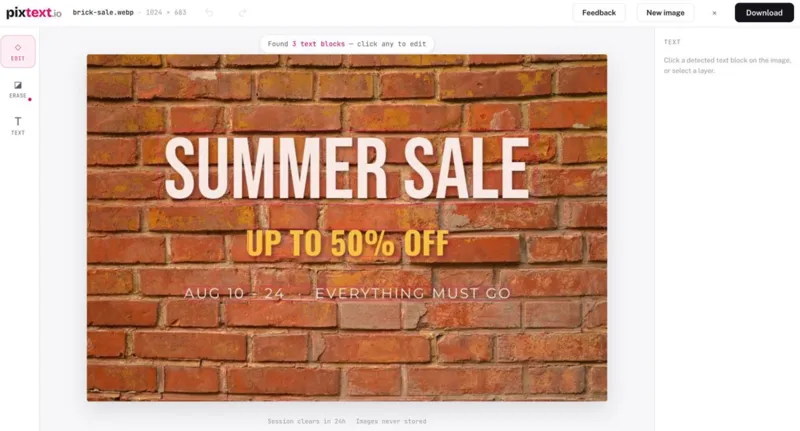
Upload a screenshot, poster, banner or product photo and every line of text is detected automatically. Click the words you want to change and type the replacement. The original pixels are erased, the background behind them is rebuilt, and the new text is set in place with matching size, colour and position. Every line you change or add stays an editable layer until you download, with 47 fonts, outlines, shadows, multi-line text and alignment controls. A manual brush handles anything detection missed.
You can also add new text to any photo, or remove text and keep the background clean.
Typical jobs: fix a typo in a UI screenshot, change the date on an event poster, update prices on a product image, rewrite a meme caption, or replace private details before sharing a screenshot.
It works best on text placed over a background, such as app screens, slides, posters and captions, which covers most of what people want to change. Upload JPG, PNG or WebP up to 10 MB and download a sharp PNG with no watermark.
Images are processed in memory, never written to permanent storage, cleared within 24 hours, and never used for training.
The free plan includes 3 images a day with the full editor. Pro ($5.90/month, 200 images) and Unlimited ($11.90/month) are there for heavier use, plus a one-time $1.99 pack of 10 images.
Key features: - Click-to-edit: text inside the image is detected automatically - AI background rebuild behind removed text (not blur) - Size, colour and position matched from the original - Editable text layers: 47 fonts, outlines, shadows, multi-line and alignment - Add new text anywhere on a photo - Manual brush for anything detection missed - No watermark; JPG / PNG / WebP in, PNG out - Images processed in memory, never stored or used for training
AI Tool
Analytics
AI Tool Categories
AI agents that analyze and process visual data
AI agents designed to enhance personal and professional productivity by automating tasks, managing schedules, prioritizing work, and providing insights to improve efficiency.
AI agents specializing in processing and understanding image data, providing capabilities such as classification, segmentation, and feature detection for diverse applications.
AI Tool Use Cases
Reviews
Need help implementing PixText?
Connect with certified implementation partners who can help transform your business with PixText. Our vetted experts specialize in AI integration and deployment.
Find Implementation PartnersVetted Experts
Pre-screened partners with proven expertise in AI implementation
Fast Deployment
Accelerate your AI integration with experienced professionals
Guaranteed Results
Work with partners who understand your business needs
AI Tool
Analytics
AI Tool Pricing
Free Tier AvailableFreemium Model
Free basic features with premium features available for paid users. Start for free and upgrade as needed.
Paid plans starting from
Free tier includes basic features to get started
Prices may vary based on usage volume and selected features. Contact sales for custom enterprise pricing.
Integration Methods
Need help implementing PixText?
Connect with certified implementation partners who can help transform your business with PixText. Our vetted experts specialize in AI integration and deployment.
Find Implementation PartnersVetted Experts
Pre-screened partners with proven expertise in AI implementation
Fast Deployment
Accelerate your AI integration with experienced professionals
Guaranteed Results
Work with partners who understand your business needs
Similar Tools

Artflow AI
AI-powered tool for creating personalized, full-body characters from user-uploaded images.

Leonardo Ai
AI platform for game asset creation and photorealistic image generation.

ResizeBento
Browser-based bulk image resizer with privacy-first local processing and format conversion.

AI Photo Editor
Transform images with AI using simple text prompts—no sign-up, instant professional edits.
Featured Agents
Discover our hand-picked selection of exceptional AI agents

Replit
Replit, Inc.
AI-powered platform for building full-stack apps with parallel agents, no coding required.
(4.0)
KnockoutStocks
KnockoutStocks
Smart stock analysis platform with AI-powered factor scoring for investment decision-making.
(5.0)

Unbounce
Unbounce Inc.
AI-powered landing page builder with no-code A/B testing and conversion optimization for marketers.
(0.0)

Wispr Flow
Wispr
AI-powered voice dictation that turns natural speech into polished writing 4x faster than typing.
(0.0)
Palabra.ai
Palabra AI
Real-time AI speech translation for live calls, events, and streams in 60+ languages.
(0.0)