
Similar Tools
About PageVeil
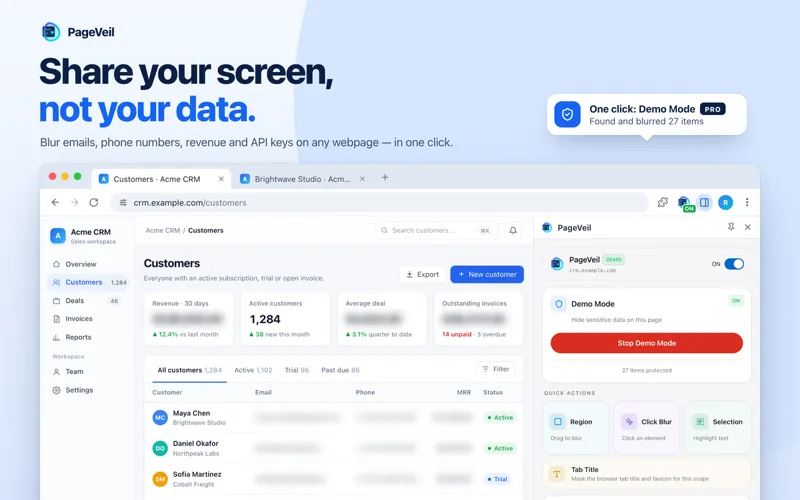
PageVeil is a Chrome, Edge, and Firefox extension that blurs, hides, or replaces emails, phone numbers, API keys, and other sensitive data on live webpages before screen sharing, demos, recordings, and screenshots. Click an element, drag a region, or highlight exact words to cover them. Saved rules re-apply after refreshes and in-app navigation. Detection and blurring run locally in your browser.
What PageVeil Does
PageVeil is a browser extension designed to protect sensitive data during live demos, customer calls, screen recordings, and screenshots. It runs directly in your browser on real production webpages—no code integration required—and lets you blur, hide, or replace private information before it reaches your audience.
Who It's For
PageVeil is built for sales engineers, product marketers, support teams, IT consultants, and operations professionals who regularly share their screen while working with real customer data. If you demo SaaS dashboards, CRMs, admin panels, analytics tools, or internal apps, PageVeil helps you maintain privacy and compliance without disrupting your workflow.
The Problem It Solves
Sharing live webpages during demos and support calls often means exposing real customer names, emails, API keys, revenue numbers, patient data, and other sensitive details. Traditional post-production blurring only works after the fact, and manually checking every field before a call is slow and error-prone. PageVeil creates a privacy layer in real time, so you can present confidently without accidental data leaks.
Key Features and Capabilities
- Click, Region, and Selection Blur: Click individual elements, draw rectangular regions, or highlight exact words and numbers to protect
- Fake Data Replacement: Swap real names, emails, totals, order IDs, and API keys with realistic demo-safe placeholders that keep pages believable
- Saved Rules with Auto-Apply: Save protection rules by URL, page path, or domain, then automatically re-apply them after page refreshes and single-page app navigation
- Demo Mode Toggle: Turn all saved protections on or off with one click before screen shares, then restore the page after the call
- Tab Title and Favicon Masking: Hide project names, customer names, ticket IDs, and order details that leak through browser tabs
- Auto-Scan for Sensitive Fields: Automatically detect and flag potential PII, emails, and sensitive data before you share
- Adjustable Blur Strength: Choose between a light visual blur and a fully unreadable mask, globally or per saved rule
- Quick Remove and Hold-to-Reveal: Hover to remove individual protections, or use keyboard shortcuts to temporarily peek at real values during calls
- Local-First Processing: Normal blur and replacement workflows run in your browser without uploading page content
Typical Workflows
Prepare a page in three steps: (1) Select sensitive data by clicking elements, drawing regions, or highlighting text, (2) Choose to blur, hide, or replace values with demo-safe placeholders, (3) Turn on Demo Mode before your screen share, recording, or screenshot. Saved rules persist across sessions and auto-apply when you return to the same site or section.
Integrations and Platform Support
PageVeil is available as a browser extension for Chrome, Microsoft Edge, and Firefox. It works on live webpages including SaaS dashboards, CRMs, admin panels, analytics tools, support platforms, and internal apps. The side panel UI lets you control blur, replacement, saved rules, and Demo Mode without covering the page you're preparing.
What Differentiates PageVeil
Unlike post-production screenshot editors or generic screen blur tools, PageVeil applies protections before the data reaches viewers, supports repeatable saved rules for recurring demos, offers realistic fake data replacement to maintain page credibility, and integrates directly into your existing browser workflow. It's a practical privacy layer for teams that need to demo real products with real data while maintaining customer trust and compliance standards.
AI Tool
Analytics
AI Tool Categories
AI tools for cybersecurity, threat detection, and system protection
AI agents designed to enhance personal and professional productivity by automating tasks, managing schedules, prioritizing work, and providing insights to improve efficiency.
AI Tool Use Cases
Data Processing
Automated handling, transformation, and analysis of large datasets using AI algorithms
Cybersecurity
AI agents in cybersecurity focus on protecting systems, networks, and data from cyber threats. These agents can monitor for suspicious activities, detect vulnerabilities, respond to breaches in real time, and predict future risks based on emerging threats.
Compliance
AI agents specialized in ensuring adherence to regulations, policies, and legal standards. These agents can perform tasks such as monitoring regulatory changes, validating data privacy practices, identifying potential risks, and streamlining compliance workflows.
Reviews
Need help implementing PageVeil?
Connect with certified implementation partners who can help transform your business with PageVeil. Our vetted experts specialize in AI integration and deployment.
Find Implementation PartnersVetted Experts
Pre-screened partners with proven expertise in AI implementation
Fast Deployment
Accelerate your AI integration with experienced professionals
Guaranteed Results
Work with partners who understand your business needs
AI Tool
Analytics
AI Tool Pricing
Free Tier AvailableFreemium Model
Free basic features with premium features available for paid users. Start for free and upgrade as needed.
Paid plans starting from
Free tier includes basic features to get started
Prices may vary based on usage volume and selected features. Contact sales for custom enterprise pricing.
Integration Methods
Need help implementing PageVeil?
Connect with certified implementation partners who can help transform your business with PageVeil. Our vetted experts specialize in AI integration and deployment.
Find Implementation PartnersVetted Experts
Pre-screened partners with proven expertise in AI implementation
Fast Deployment
Accelerate your AI integration with experienced professionals
Guaranteed Results
Work with partners who understand your business needs
Similar Tools

Rails Guard
Live AI data masking and passwordless authentication for Rails console sessions with audit trails.

Protectstar
Privacy-first security suite with AI-powered malware detection and certified data erasure for all platforms.

Apex AI Security Platform
Enterprise AI security platform for safe GenAI adoption across all LLMs and copilots.

Wald AI
Enterprise AI governance platform with DLP for secure LLM access and data leak prevention.
Featured Agents
Discover our hand-picked selection of exceptional AI agents

Replit
Replit, Inc.
AI-powered platform for building full-stack apps with parallel agents, no coding required.
(4.0)

Unbounce
Unbounce Inc.
AI-powered landing page builder with no-code A/B testing and conversion optimization for marketers.
(0.0)

Wispr Flow
Wispr
AI-powered voice dictation that turns natural speech into polished writing 4x faster than typing.
(0.0)

KnockoutStocks
KnockoutStocks
Smart stock analysis platform with AI-powered factor scoring for investment decision-making.
(5.0)

Palabra.ai
Palabra AI
Real-time AI speech translation for live calls, events, and streams in 60+ languages.
(0.0)