
Similar Tools
About LiveFaceSwapVideo
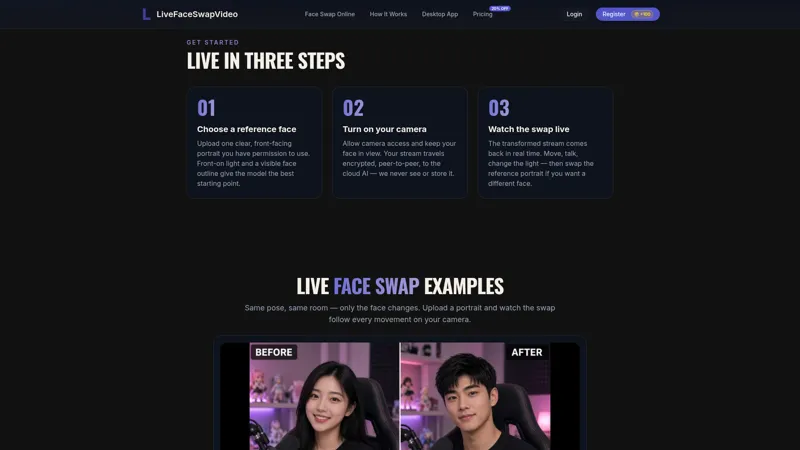
LiveFaceSwapVideo is a real-time AI face swap for your webcam. Upload a reference portrait, turn on your camera, and see the swap live in the browser — or use the free Windows desktop app’s virtual camera in OBS, Zoom and Meet. Cloud-powered, no GPU; 100 free credits to start.
The tool is built for creators, livestreamers, and anyone who wants to try a different look on camera without pre-recording or waiting for a render. Your browser sends the camera stream over an encrypted WebRTC connection to a cloud model, then displays the transformed output at interactive latency, so movement and expression are reflected as they happen. You do not need a powerful local GPU or a large model download.
Key capabilities include live face swap from a reference portrait, optional try-on and restyle modes, and a desktop virtual camera for software that accepts a camera input. In the browser, you can test effects with no installation. On Windows, the free desktop app exposes a system-level virtual camera that works with OBS, Zoom, Google Meet, Discord, Microsoft Teams, and other streaming or meeting apps. A macOS beta is also offered on the website.
New accounts receive 100 free credits to start — enough for a short live session on Live V2.0. Additional time is sold as credit packs or subscriptions, so you can pay only for the live minutes you need. Credits are used after the AI video appears, at a stated rate of 3 credits per second on Live V2.0. Camera feeds and live outputs are processed in transit and are not recorded or stored by the service.
A typical workflow is simple: upload or pick a clear, front-facing reference portrait, start the camera, preview the result in the browser, then optionally route the Windows virtual camera into OBS or a meeting app when you are ready to go live. LiveFaceSwapVideo is designed for creative and professional camera use in the browser and on the desktop, with cloud processing so almost any device with a camera and a stable connection can run a live session.
AI Tool
Analytics
AI Tool Categories
AI agents that analyze and process visual data
AI agents for creating and synthesizing video content
AI-powered video editing, enhancement, and post-processing tools
AI tools for visual effects, animation, and motion graphics
AI tools and platforms designed to create, optimize, and enhance digital content. These agents assist in generating text, images, audio, video, and multimedia assets, catering to diverse needs across industries such as marketing, education, entertainment, and e-commerce.
AI Tool Use Cases
Video Creation
Create and edit video content
Design and Graphics
Create and edit graphic designs
Video Editing
AI tools that help automate and enhance the video editing process, including transitions, effects, and scene recognition.
Face Swap
AI agents utilize advanced image processing techniques to swap faces seamlessly in photos or videos, enabling applications in entertainment, content creation, and augmented reality.
Reviews
Need help implementing LiveFaceSwapVideo?
Connect with certified implementation partners who can help transform your business with LiveFaceSwapVideo. Our vetted experts specialize in AI integration and deployment.
Find Implementation PartnersVetted Experts
Pre-screened partners with proven expertise in AI implementation
Fast Deployment
Accelerate your AI integration with experienced professionals
Guaranteed Results
Work with partners who understand your business needs
AI Tool
Analytics
AI Tool Pricing
Free Tier AvailableFreemium Model
Free basic features with premium features available for paid users. Start for free and upgrade as needed.
Paid plans starting from
Free tier includes basic features to get started
Prices may vary based on usage volume and selected features. Contact sales for custom enterprise pricing.
Integration Methods
Direct website or browser integration
AI agents that integrate with web applications to provide enhanced features, such as customer support or content generation.
AI agents with desktop applications to enhance functionality and workflows. These integrations enable advanced features like local data processing, task automation, and offline capabilities, making AI agents more accessible for professional and personal use.
Need help implementing LiveFaceSwapVideo?
Connect with certified implementation partners who can help transform your business with LiveFaceSwapVideo. Our vetted experts specialize in AI integration and deployment.
Find Implementation PartnersVetted Experts
Pre-screened partners with proven expertise in AI implementation
Fast Deployment
Accelerate your AI integration with experienced professionals
Guaranteed Results
Work with partners who understand your business needs
Similar Tools

Genjutsu AI
AI video editor that swaps objects, scenes & styles while preserving original motion and camera movement.

Genjutsu AI
Genjutsu AI is an AI video generator for motion transfer and object swap with your own photos.
Face Swap AI
Create Deep fake anonymously with AI

ShortGPT
AI-driven tool for generating short scripts, voiceovers, and video content.
Featured Agents
Discover our hand-picked selection of exceptional AI agents

Unbounce
Unbounce Inc.
AI-powered landing page builder with no-code A/B testing and conversion optimization for marketers.
(5.0)

Replit
Replit, Inc.
AI-powered platform for building full-stack apps with parallel agents, no coding required.
(4.0)

KnockoutStocks
KnockoutStocks
Smart stock analysis platform with AI-powered factor scoring for investment decision-making.
(5.0)

Palabra.ai
Palabra AI
Real-time AI speech translation for live calls, events, and streams in 60+ languages.
(0.0)

Wispr Flow
Wispr
AI-powered voice dictation that turns natural speech into polished writing 4x faster than typing.
(0.0)